Setup guide · Temu Order Fetcher

Getting your Temu API keys

The Temu Order Fetcher connects to your shop using three values from Temu's own open platform — an app key, an app secret and an access token — plus one thing most people miss: your server's IP has to be registered with Temu. Here's every step, in order.

Before you start

What you need in front of you

To get your keys

  • Your normal Temu seller account login
  • Apps and services → Manage your apps in Seller Central — free for your own shop
  • A few days' patience — Temu's compliance & security assessment has to be approved first
  • Hosting with a fixed public IP address (see step 5 — non-negotiable)
  • The Fetcher's Connection page open in another tab — it shows your server's IP in a copy-ready box and has a test button
Do this before you buy. Applying for Temu API access takes a few days and not every account is approved straight away. Getting your keys first is the surest proof the tool will work for you — and since all sales are final, it's the safest way to buy. See the product page or email us if you're unsure your account qualifies.
1

Add a self-developed app

Log in to Temu Seller Central with your normal seller account, open Apps and services → Manage your apps, and click Add a self-developed app. Only one self-developed app is allowed per account, and using the API for your own shop is free.
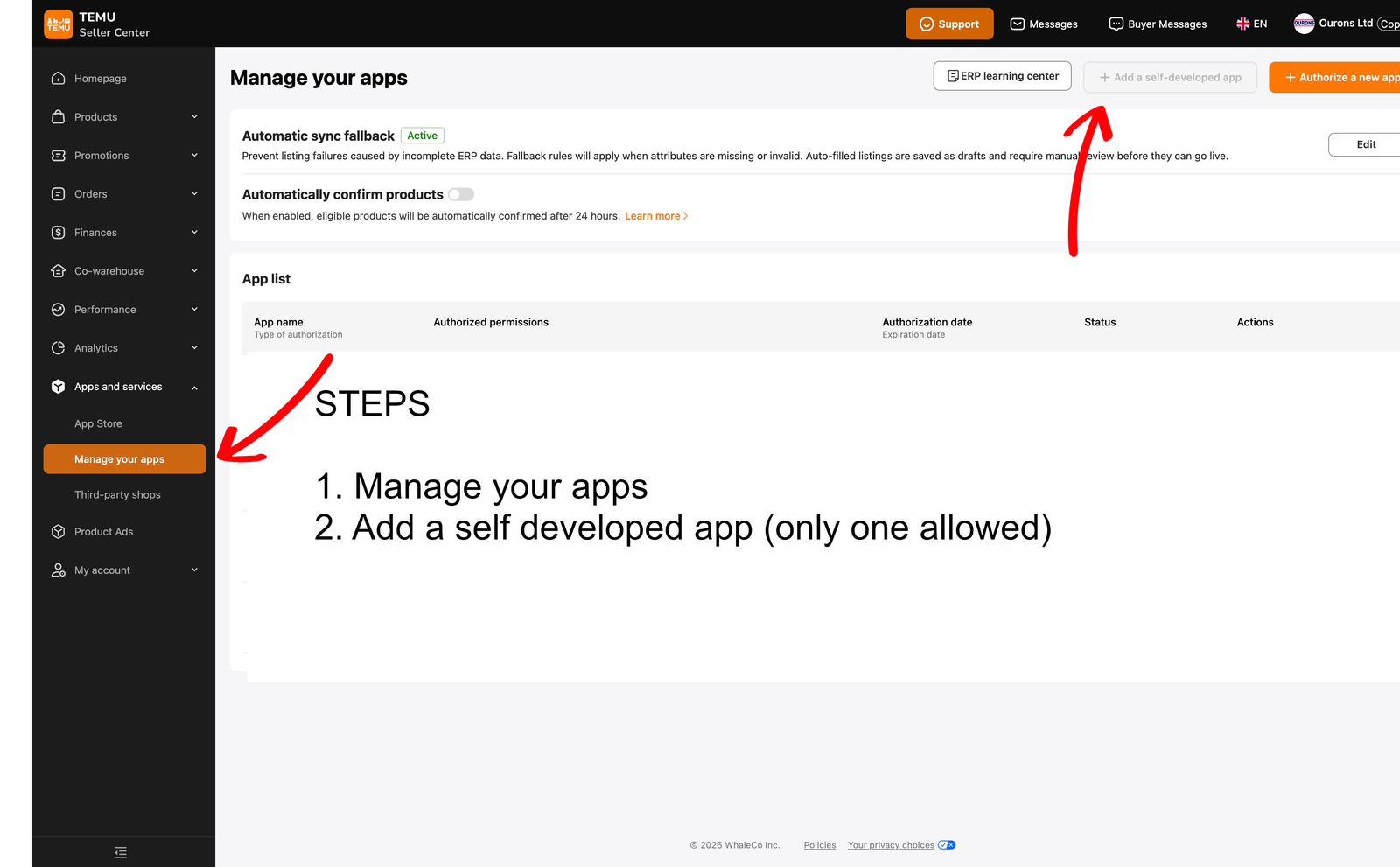
Temu Seller Central — Apps and services, Manage your apps, Add a self-developed app
Seller Central → Apps and services → Manage your apps → Add a self-developed app.
2

Fill in the app details & pass the assessment

Adding the app opens Temu's Partner Platform. Fill in the app information — including the order and logistics / shipping permissions the Fetcher needs — then complete the two questionnaires Temu requires: a Compliance and a Security assessment. You'll be asked where your company is based, which cloud provider you use, and for an IP white list — which must be a fixed EU or UK server IP (see step 5).
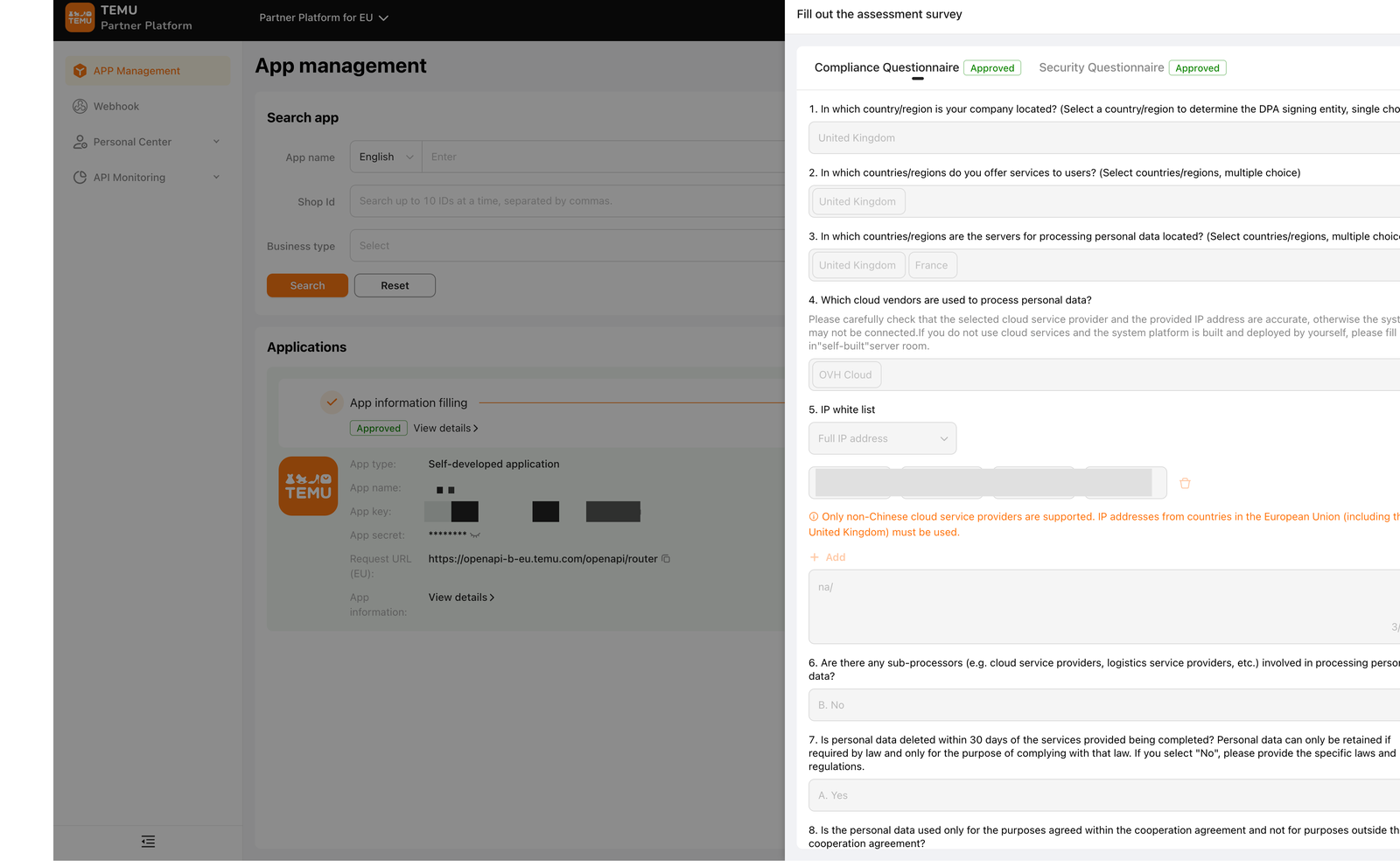
Both stages must show "Approved". The app isn't usable until App information filling and Compliance and security assessment are both approved — this can take a few days, so start early.
Temu Partner Platform — app details and the compliance and security assessment survey
The Partner Platform app page, with Temu's compliance & security assessment survey.
3

Copy your app key & app secret

Once both stages are approved, your app name, app key and app secret appear on the app's management page — copy the key and secret. Note the app's Request URL too (EU sellers: openapi-b-eu.temu.com); the Fetcher uses it for the Europe region.
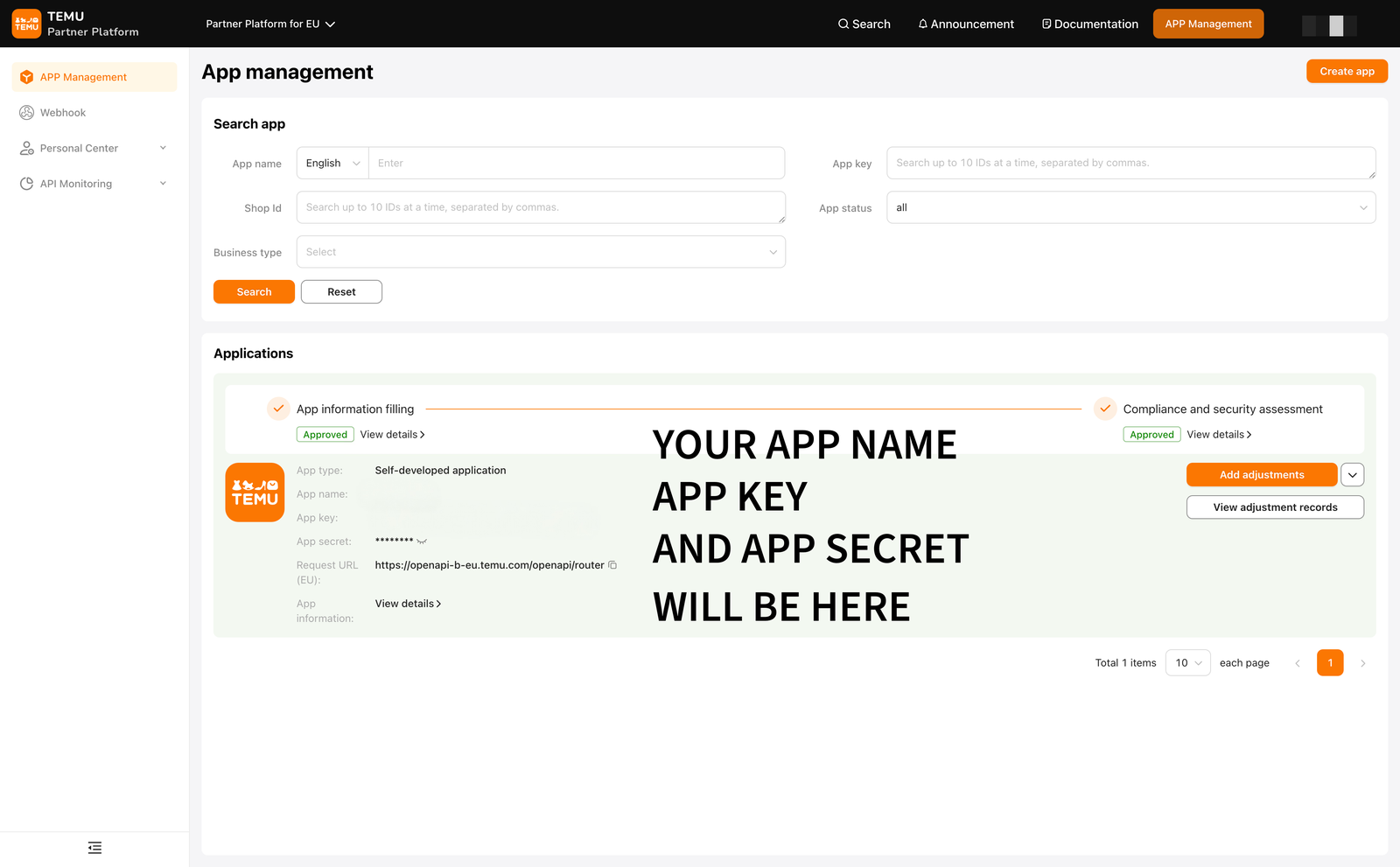
Keep the app secret private. It's a password: anyone with it can act as your app. Don't email it or paste it into a chat — the Fetcher stores it in your own database or your own Google Secret Manager, never with us.
Temu Partner Platform — app key and app secret shown after approval
After both approvals, your app key and app secret appear here.
4

Authorise the app — your access token

Authorise the app for your own shop. Temu then issues an access token — copy it. This is the third of the three values the Fetcher needs, alongside the app key and app secret.

Tokens can expire. If the connection works today but stops months from now, re-issuing the access token is the usual fix — your app key and secret stay the same.
5

Register your server's IP — don't skip this

The IP white list you filled in during the assessment must be your server's outbound public IP, and it has to be an EU or UK address. The Fetcher's Connection page detects and shows you this exact IP in a copy-ready box.

⚠ This must be a fixed IP. Temu rejects every call from an unregistered address, so hosting whose outbound IP changes — some budget shared hosting, serverless platforms, home broadband — will not work. There is nothing any tool can do about that; it's how Temu's API is built. A small VPS (from a few pounds a month) or any hosting with a dedicated IP is fine. Not sure what you have? Ask your host: "Is my outbound IP fixed?"
6

Paste the three values in and test

Open the Fetcher's Connection page, paste the app key, app secret and access token, choose your region (Europe for UK/EU sellers), save, and click Test connection. The test makes one tiny order-list call and tells you in plain English whether the problem — if any — is the credentials, the IP allowlist, or a missing scope.

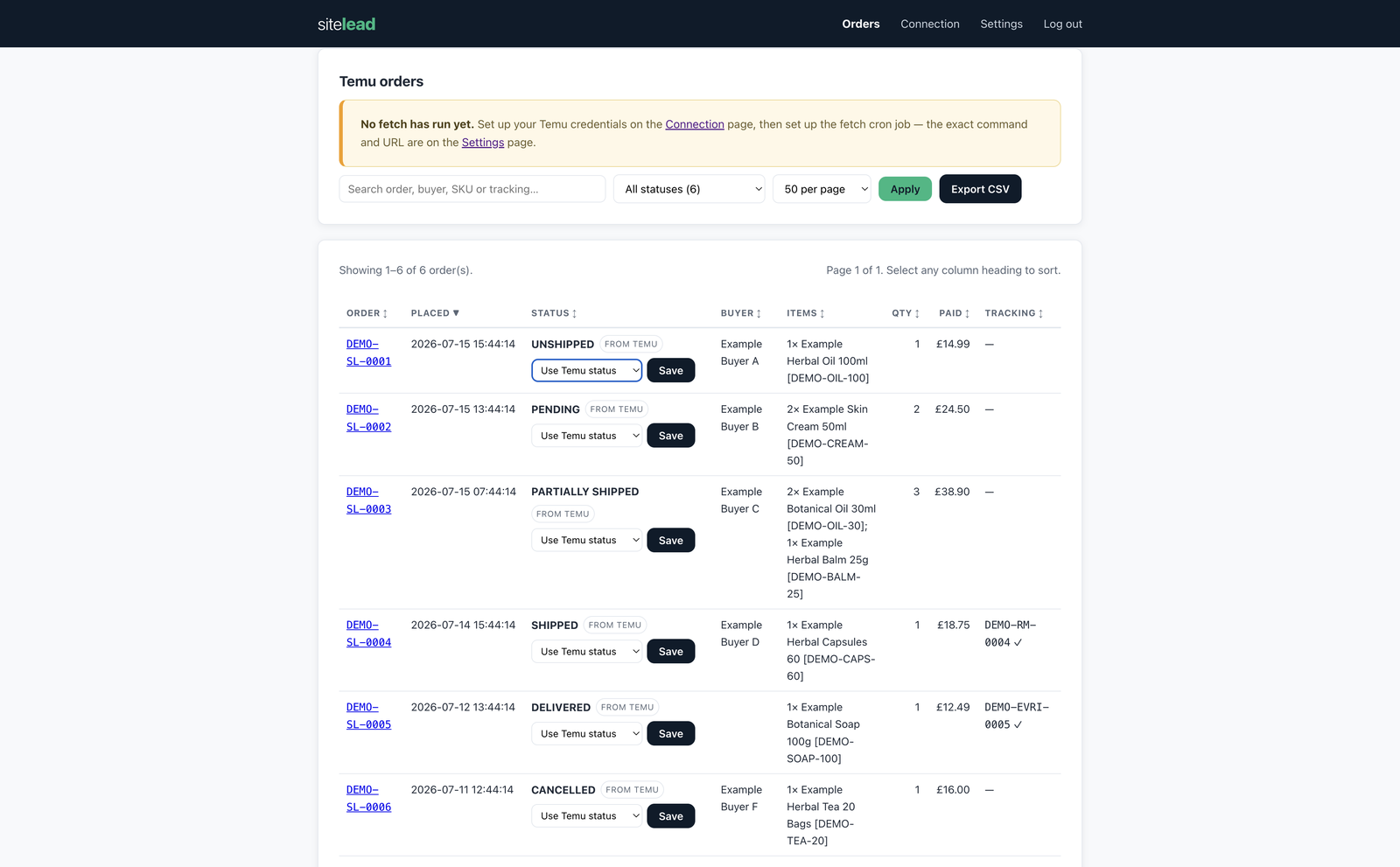
Temu Order Fetcher dashboard — a searchable, sortable table of Temu orders with buyer, items, amounts, status and tracking
A green “connected” result means you're done — your Temu orders land in a table you own, ready to search and export. (Demo data shown.)

If the test fails

Three usual suspects — and the fix for each

Wrong credentials

Re-copy the app key, secret and token letter-by-letter — a stray space at the start or end is the most common cause. Re-issue the access token if in doubt.

IP not allow-listed

Add the exact IP the Connection page shows to Temu's allowlist, then wait a few minutes for Temu to apply it and test again.

Missing scope

Enable the order-query and logistics permissions on the app. A permission error always means a scope isn't switched on.

Still stuck? Email ln3@sitelead.co.uk with a screenshot of the test result and we'll get you connected — support is included, and the three-month guarantee covers Temu changing its API.

FAQ

Common questions about Temu API keys

How long does Temu take to approve API access?

Usually a few days. It isn't always instant, and not every account is approved on the first try — which is exactly why we suggest getting your keys before you buy the Fetcher.

Does it cost anything to use Temu's API?

No — using the API for your own shop is free. You're only paying once for the Fetcher itself (£199 + VAT), never per order or per call.

Why do I need a fixed IP address?

Temu only accepts API calls from server IPs you've registered in advance. If your hosting sends traffic from changing IPs, Temu rejects the calls. A basic VPS or any dedicated-IP hosting solves it. See step 5.

Will sitelead ever see my keys?

No. Your keys come from your own seller account and are stored in your own database or your own Google Secret Manager project. They never pass through us.

The connection stopped working months later — what changed?

Almost always an expired access token. Re-issue it on Temu's Partner Platform (step 4) and paste the new one into the Connection page — your app key and secret don't change.

This guide is for the Temu Order Fetcher

Your Temu orders pulled onto your own server — searchable, exportable, with tracking pushed back to Temu. £199 + VAT, once.

See the Temu Order Fetcher