Your settlement report is the single file that says exactly what Amazon paid you and why — sales, refunds, fees and VAT for one payout period. It's what the splitter reads to reconcile a disbursement to the penny. There are two ways to get it in: connect the API once, or download the Flat File V2 by hand. Both are below.
Pick your route
Authorise Amazon's Selling Partner API once and the splitter pulls every settlement for you — nothing to download, and no scramble to save each file before Amazon drops it at 90 days.
Set up API access →Rather keep it hands-on, or just need one file this once? Grab the Flat File V2 straight from Seller Central in three short steps — that's the rest of this guide.
Jump to the steps ↓Which should I use? If you reconcile every month, the API route saves the most time and never misses a period. The manual download is perfect for a one-off, a spot check, or if you'd simply rather not connect anything.
Before you start
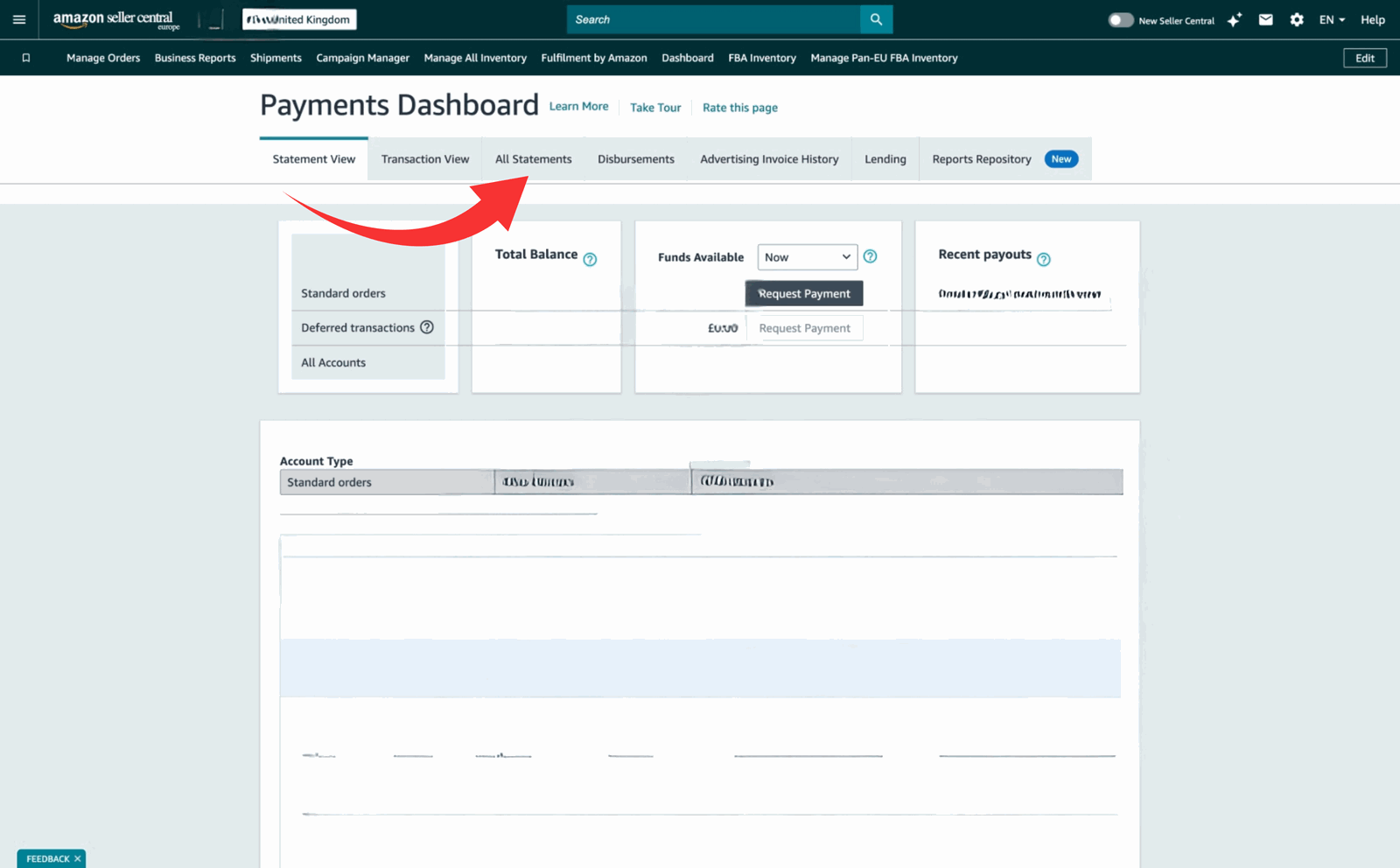
.txt file (it's tab-delimited)Log in to Amazon Seller Central. In the menu, open Reports › Payments (on some accounts the Payments link sits directly in the main menu). The Payments dashboard opens on the Statement View tab.
Along the top of the Payments dashboard you'll see a row of tabs — Statement View, Transaction View, All Statements, Disbursements and more. Open All Statements. Each row is one settlement period, with the amount Amazon paid out for it.
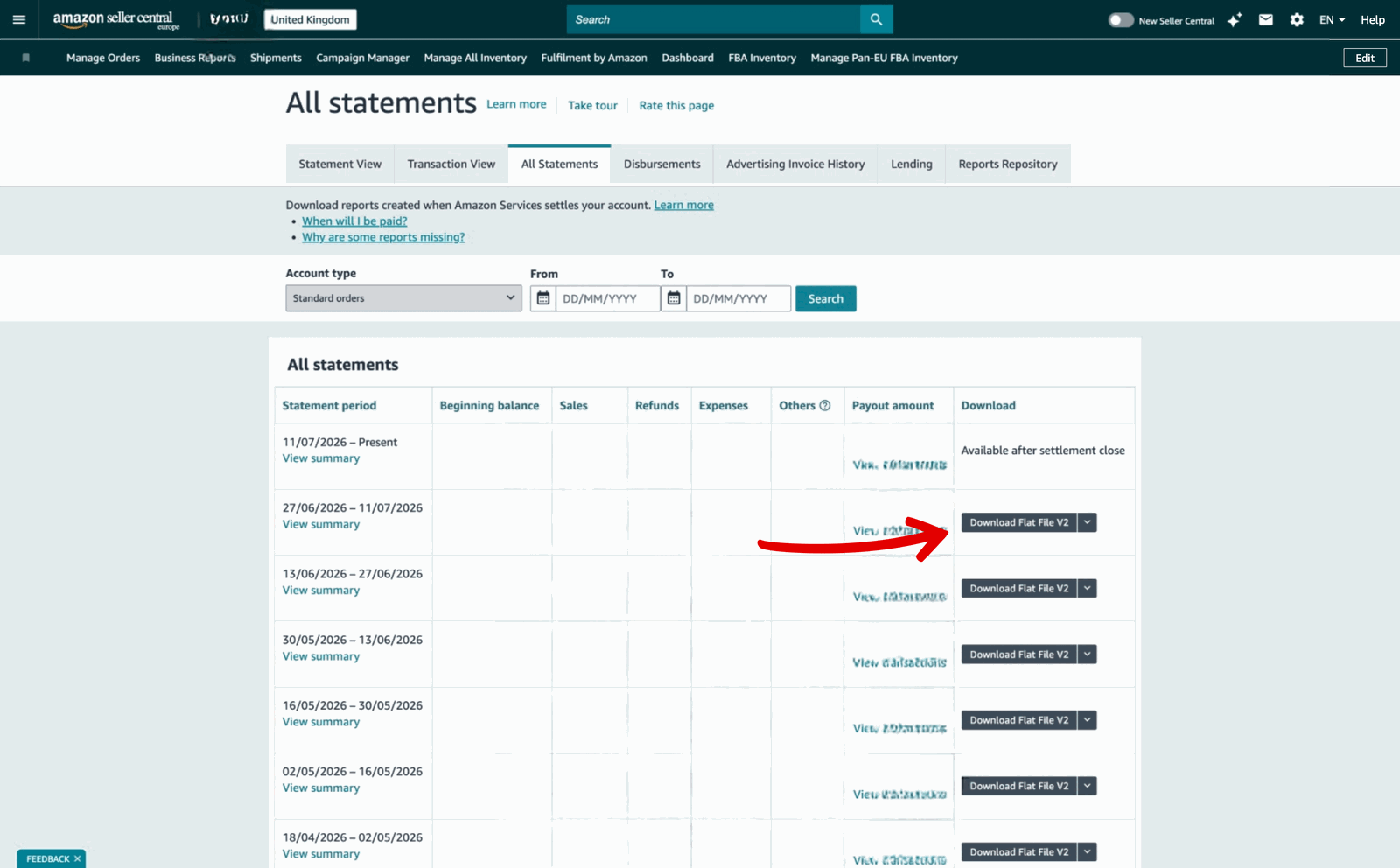
Find the settlement period you want to reconcile and click Download Flat File V2 on that row. This is the format the splitter reads — and the one Amazon itself now recommends.
.txt.Now load it in
Save the .txt somewhere you'll find it, then upload it to the
settlement splitter. It decodes every line — sales, refunds, FBA and
referral fees, and VAT — and produces a reconciled breakdown ready for Xero
(or any tool that takes the same split). It balances back to the exact
disbursement amount.
Doing this every month? Skip the download entirely — connect the Amazon API once and each settlement lands in the splitter automatically as it closes.
FAQ
No. Connect Amazon's Selling Partner API once and the splitter pulls each settlement automatically as it closes — no downloads, no 90-day deadline to beat. See Set up API access. The manual download here is the alternative if you'd rather not connect anything.
Flat File V2. It's tab-delimited, downloads as a
.txt, and carries the full financial detail for the
period. The old V1 flat file and XML formats were discontinued in
2022.
90 days. Amazon only keeps settlement reports available for the last three months, so download and archive each one as it closes — or connect the API, which captures them for you.
Each marketplace settles separately, so you'll download a report per marketplace (for example UK and the EU stores). The splitter handles each one, including non-GBP settlements.
Transaction View and date-range reports summarise activity for dates you choose; a settlement statement matches an actual payout. To reconcile a disbursement to your bank, you want the settlement statement — Flat File V2.
The settlement splitter turns each Flat File V2 into a clean, VAT-correct breakdown that balances to the penny — and it can pull them for you over the API. Ask us about it.
Ask about the settlement splitter